Introducing VisoWork
The next generation of AI agents goes beyond images — they'll skim through video, capture any moment that matters, and handle video analysis and search with ease.
VisoWork gives your agent a sharp pair of eyes. An agent-friendly vision analysis and search platform that turns camera feeds, image libraries, scanned documents, and audio into structured data your agent can search, reason about, and act on — ready to handle vision tasks in any domain.

The Problem: Video Is Invisible to AI Agents
Large language models handle text with ease but struggle the moment real-world visual information enters the picture. As soon as a workflow touches a camera feed, a product photo, or a video archive, the existing pipeline stalls:
- Video is a black box. Agents can reason about transcripts and filenames, but they can't look inside a clip.
- Frame-by-frame captioning is wasteful. It burns tokens, loses cross-frame context, and still produces unstructured prose an agent has to re-parse.
- Text-only search misses the visual signal. "Find the clip where a forklift crossed the yellow line" has no useful keywords.
- Everyone rebuilds the same stack. Vision models, embeddings, vector stores, object storage, rate limiting — every team ends up stitching the same pieces together before they can ship anything useful.
How VisoWork Solves It
One platform, three core capabilities:
- Vision Analysis. Describe, OCR, detect, and classify — every endpoint returns structured JSON your agent can reason about directly, with bounding boxes, confidences, and token usage.
- Multimodal Retrieval. A single embedding space across images, video frames, text, and audio. Build a searchable library once; query it in natural language.
- Agent-Ready Skills. VisoWork doesn't stop at raw APIs. We ship packaged skills your agent installs and uses natively — prompts, tool bindings, and examples included.
Architecture
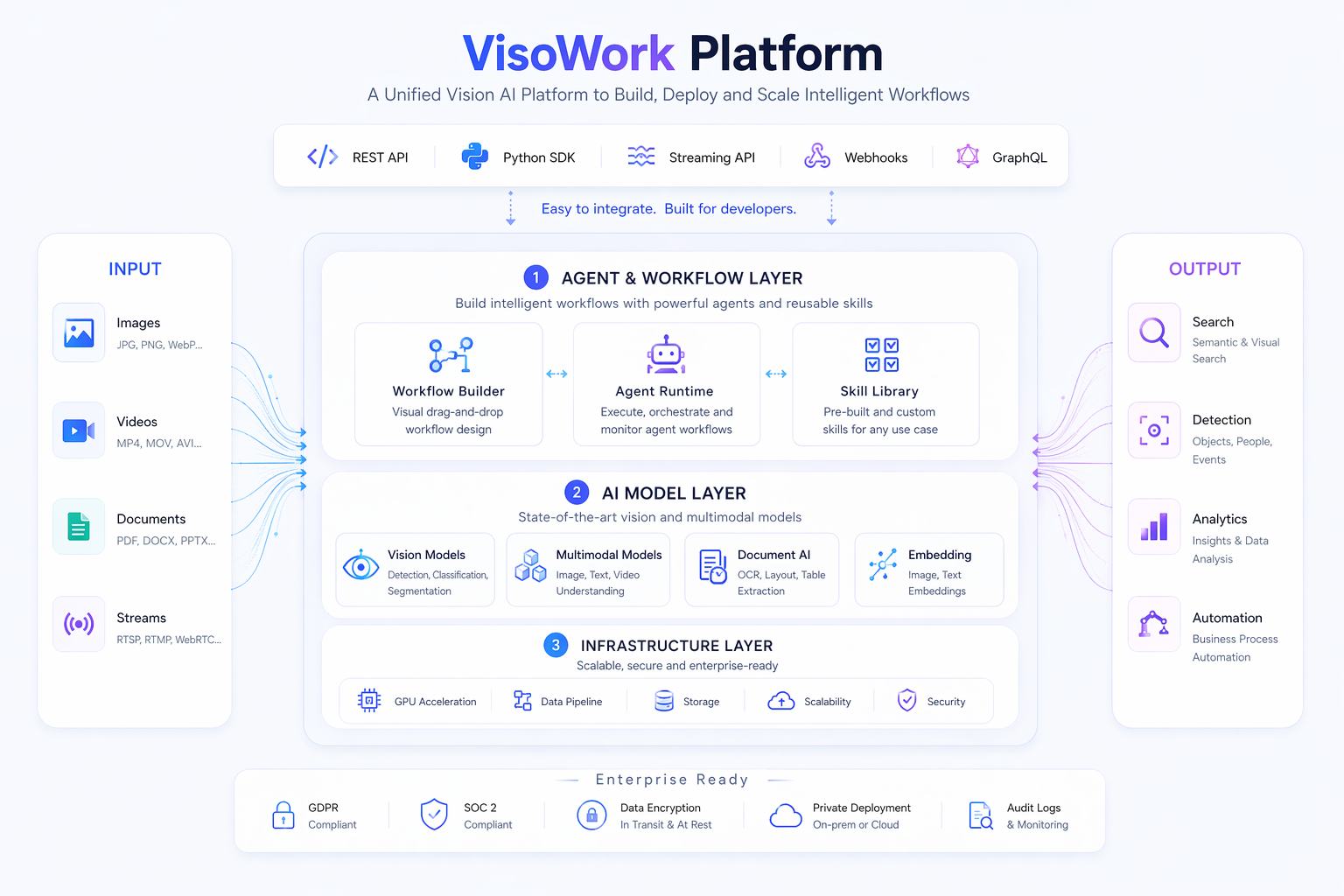
VisoWork is a unified vision AI platform built in four layers:
- Data Ingestion — cameras, phones, webcams, scanners, and external drives feed images, video, and documents into the platform.
- Agent Services Layer — a domain Skill Library (retail, industry, finance, media, healthcare, logistics) that your agent invokes from a sandboxed Agent Runtime, with an Algo Pipeline and Workflow Manager orchestrating multi-step tasks.
- Model Services — image models (ResNet, ViT) for classification and segmentation; VLMs (CLIP, BLIP, CogView) for captioning, reasoning, and zero-shot retrieval; document models (DCR, LayoutLM) for text extraction and structure analysis; embedding models (CLIP, BigLIP) for cross-modal vectors.
- Infrastructure & Compute — GPU-backed inference with multi-tenant scheduling underneath.
On top, prebuilt Viso Applications cover retail, industry, and finance workflows, with a custom workflow slot for anything else. Alongside, Project & Data Storage, a Data Lake, the Analytics Dashboard, and GDPR / SOC2 compliance ship built-in. Authentication is by project-scoped API keys; vision endpoints are rate-limited to 60 requests per minute, storage endpoints to 300.
Use Cases
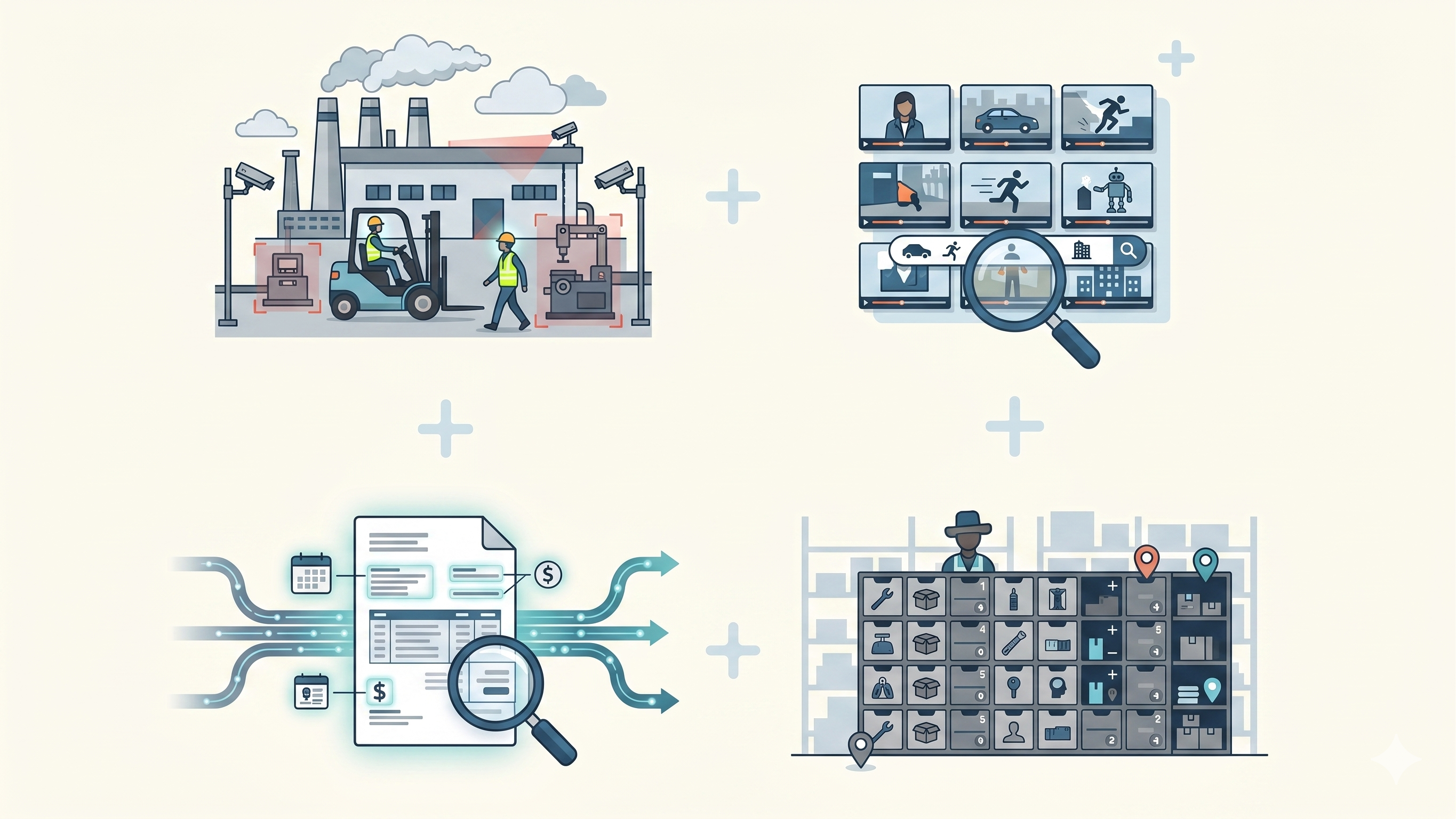
- Industrial safety & compliance — monitor camera feeds for hazards, PPE compliance, and restricted-zone violations without a human operator in the loop.
- Video asset libraries — search hours of footage by what actually appears in the frame: objects, actions, people, scenes. No manual tagging.
- Document, receipt & invoice OCR — extract structured text plus block-level positions from scanned pages, ready for downstream automation.
- Inventory & physical operations — count, classify, and locate items from still photos; power warehouse and retail workflows.
Ways to Use VisoWork
Pick the surface that matches your team's workflow. All four share the same API key, the same project, and the same billing.
1. Workspace
A web-based workspace for non-developers and hands-on exploration. Create a project, upload files, and run sessions against agents that already have the full VisoWork toolset wired in. Good for evaluation, internal review, and anyone who'd rather not touch code.
→ Read the Workspace docs.
2. Agent Skills
Install a VisoWork skill directly into your own AI agent — Claude Code, Cursor, or any skill-aware client. The skill bundle ships prompts, tool bindings, and examples so the agent uses vision the way you'd expect a teammate to.
→ Browse the Skills catalog.
3. REST API
Direct HTTPS endpoints for custom applications and automated pipelines. Authenticate with a project-scoped API key and send requests to /v1/vision/* or /v1/storage/*.
→ See the API reference.
4. MCP Server
Expose VisoWork tools over the Model Context Protocol so any MCP-compatible client can discover and call them. Best when your agent runtime already speaks MCP and you want zero bespoke integration.
→ Follow the Setup Guide to configure an MCP client.
Pricing
VisoWork is pay-as-you-go and metered per request. A free tier is available for evaluation and small projects. You can see current rates and live usage from Billing inside any project, and each project owner sets their own spending limit.
For more detail on how metering and invoicing work, see the Billing FAQ and the Terms of Service.
Next Steps
- Setup Guide — install a VisoWork skill into your agent and make your first vision request.
- Skills Catalog — ready-made vision skills to drop into your agent.
- API Reference — endpoints, authentication, rate limits.